
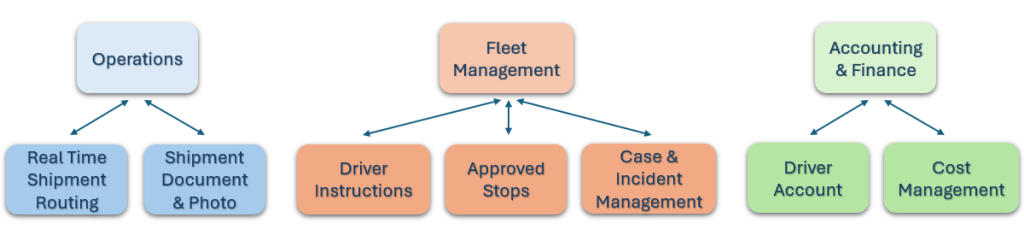
One of the biggest problems faced by vehicle ownership companies is driver management. Simultaneous communication between drivers and various departments is often problematic. Scenarios where drivers only communicate with fleet managers often lead to communication gaps and the inability to complete necessary tasks on time. With Freighten TMS’s integrated system approach, drivers can communicate with all departments simultaneously, preventing potential information gaps and significantly improving overall work quality.
All information, including the freight route created during the operation and all route details, the loading and unloading address, departure and arrival customs points, country exit points, and preferred route information, is transmitted sequentially to your driver. For each step, your driver enters the date and time, and this information is directly reflected in your system and, from there, in your customer portal.
All documents generated during the operation, including CMRs, road permits, customs documents, loading documents, and all other documents, can be directly added to the operation by the driver. Furthermore, the driver can take necessary photos during loading, customs clearance (if applicable), and unloading and add them directly to the system.
You can create driver instructions through your fleet management system, allowing your newly hired drivers to access all the company’s driver instructions directly through Driver Link. You can easily access your instructions for any situation, including pre- and post-trip instructions, and much more.
Your drivers can see and use all safe places on the route, such as car parks, gas stations, repair centres and others approved by your company, directly on the map.
Your drivers can report any incident during a trip directly to you through the system. Actions taken are then processed into the system, allowing the problem to be resolved and resolved. The company maintains a track record of problems across the entire fleet, creating a company memory for these issues.
The current account you create for your drivers through the accounting system appears directly in the driver app. This allows drivers to access their accounting records and monitor their receivables and credits directly from the system, preventing any accounting confusion. Per diems paid to drivers and all payments made in return can be tracked in detail in this account statement.
Your drivers can record operational costs incurred during operations directly into the system as expenses under the operations section. These expenses are automatically added to the pending approval pool and, upon approval by the operations side, will be transferred to the accounting screens. This allows for transparent control of driver expenses.
General expenses incurred by your drivers on vehicles, i.e., non-operational expenses, can be recorded directly in the system in this section. You can track expenses such as vehicle repairs and maintenance, or expenses related to vehicle inventory, directly in this section.
The checklist system is an important tool for drivers to regularly check their vehicles for the necessary equipment and vehicle components before and after a trip. Each checklist is completed by the driver before each trip, under each new operation assignment, and recorded in the system. Furthermore, if a photo is required, the condition of the relevant vehicle sections before that operation is recorded in this section.